 KastorFlow
Updated November 6, 2026
KastorFlow vs NotebookLM Web Importer
Two browser extensions for NotebookLM, now Gemini Notebook. We make KastorFlow; NotebookLM Web Importer's features are from its own site and listing.
Both import into Gemini Notebook: the page you're on, lists of links, open tabs, RSS feeds and YouTube playlists, and both can publish Audio Overviews to a podcast feed. KastorFlow also checks the notebook has room first, merges a playlist into one source, then works on what's inside: it audits the sources and fills the gaps you approve, builds a research notebook from a topic, organizes notebooks with folders, tags and a library map, and runs automations. You can try it next to NotebookLM Web Importer in the same Gemini Notebook account.
Feature by feature
| Feature | KastorFlow | NotebookLM Web Importer |
|---|---|---|
| Import the page you're on, lists of links, open tabs, an RSS feed | Yes | Yes |
| Import a CSV of links, or several files at once | Yes | — |
| Check the notebook has room before importing | Yes | — |
| YouTube playlists, channels and search results, a source per video | Yes | Videos and playlists |
| Merge a YouTube playlist or channel into one source | Yes | — |
| A video's frames and transcript as one PDF source | Yes | — |
| Audit a notebook: score every source, flag weak ones, show missing kinds | Yes | — |
| Fill the gaps with sources you approve | Yes | — |
| Build a research notebook from a topic | Yes | — |
| Automations, and build, audit and fill gaps on a schedule | 10 triggers, 16 actions | — |
| Folders, collections and tags across notebooks | Yes | Tags on notebooks, search, deleting notebooks in bulk |
| Library map of every notebook, knowledge graph of each | Yes | — |
| Find duplicates in a notebook; delete sources in bulk | Yes | — |
| Browse and download every Studio artifact across notebooks | Yes | Downloads audio files |
| Audio Overviews in your own podcast feed | Yes | Yes |
| Obsidian, both ways; Readwise, Slack, Discord | Yes | — |
| Flashcards straight into an Anki deck | Yes | — |
NotebookLM Web Importer's features as listed on notebooklm-web-importer.com, its docs and its add-on listing (version 3.36.0), read November 6, 2026. — means they don't mention it, not that it can't be done. The KastorFlow column is checked against the extension itself. Spotted something out of date? Tell us and we'll fix it.
What Gemini Notebook does without either
In Add sources → Websites, Gemini Notebook takes several links at once, separated by a space or a new line. In our November 6, 2026 test we pasted 7, and all 7 came in within about 30 seconds. One article was in the list twice and came in twice, because duplicates aren't caught. The list is sorted by title, not by when you added things.
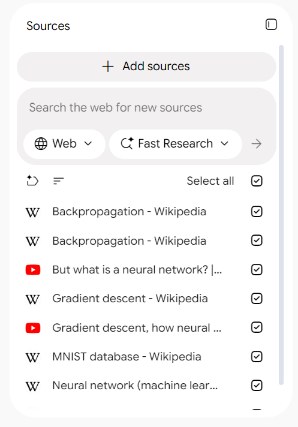
YouTube is where it trips. In our October 30, 2026 test, a playlist link brought in about 700 words of page text, titles and lengths, and no transcripts. A channel link failed with "Unable to import this web page due to domain restrictions." Single video links work, and only their transcript comes in.
What the differences mean in practice
Getting things in: mostly the same
Both put the page you're on into a notebook in one click, and both take lists of links, open tabs and RSS feeds. KastorFlow also takes a CSV of links and several files at once. On KastorFlow's Free plan, open tabs go in one at a time; several links at once, a CSV and RSS feeds are on Pro.
Room in the notebook
Before an import starts, KastorFlow checks how many of the notebook's slots are free. If the import won't fit, it says so and starts nothing, instead of stopping halfway.
YouTube playlists: separate or merged
Both get around the playlist problem. KastorFlow also reads channels and YouTube search results, and lets you choose one source per video or one merged source.
A free notebook holds 50 sources, and a 40-video course added video by video fills 40 of them. KastorFlow can merge a playlist or a channel's recent uploads into one source, one for every 100 videos, which leaves 49 slots for papers and notes. The trade-off: you can't tick single videos inside a merged source. Free includes 1 merge a month, with a free sign-in; Pro includes 50. A playlist as one source
After the import
Gemini Notebook doesn't rate sources. KastorFlow's audit checks each source two ways. It scores how relevant and how authoritative the source is for the notebook's topic, and it flags broken, cut-off or cluttered text with a score from 0 to 10, where under 6 is worth cleaning. It also rates five kinds of source, authority, academic, community, recent and practitioner, as strong, good, thin or missing. That helps once a notebook has grown past what you remember adding.
Enrich then finds sources for each gap. Nothing goes in until you tick it, and never more than the notebook has room for. Free and Pro include 1 audit and 1 enrich a month; Pro+ has no monthly limit. How the audit works
Organizing many notebooks
NotebookLM Web Importer adds tags to notebooks, search and deleting notebooks in bulk. KastorFlow tags notebooks and sources, keeps folders of sources from any notebook, draws a library map of every notebook and searches across notebooks, sources, Studio artifacts, prompts and tags (Ctrl+K). Free includes 10 folders. Gemini Notebook's own Collections now group notebooks too.
Audio
Both can publish Audio Overviews to a podcast feed. KastorFlow's feed is on Pro, with 1,000 published minutes. It also lets you browse, preview and download every Studio artifact from every notebook, on every plan.
Try KastorFlow next to NotebookLM Web Importer
You don't have to switch to compare them. KastorFlow works on the same Gemini Notebook tabs and Google account, and reads the notebooks already there. Nothing needs moving.
- Add KastorFlow to Chrome. No account is needed to start.
- Audit a notebook you know well. In KastorFlow, open Research & improve → Audit and enrich, choose the notebook and run the audit. See whether the flagged sources are the ones you would have dropped.
- Try a playlist as one source. Open a YouTube playlist, click the KastorFlow icon in Chrome's toolbar, choose Import playlist as one source and pick the notebook. It checks the notebook has room before it starts.
- KastorFlow keeps its own tags, folders and collections. It doesn't change Gemini Notebook's labels or Collections, or anything NotebookLM Web Importer has saved.
- Both can add buttons to the Gemini Notebook page. If something looks off, turn one off for a minute at chrome://extensions to see which it is.
- The library map and search across notebooks are free for 7 days, then need a free KastorFlow account.
- If you remove KastorFlow, your notebooks and the sources it added stay in Gemini Notebook.
Try KastorFlow free, alongside whatever you use now.
Add to ChromeQuestions
What's the difference between KastorFlow and NotebookLM Web Importer?
Both import into NotebookLM, now Gemini Notebook: the page you're on, link lists, open tabs, RSS feeds and YouTube playlists, and both publish Audio Overviews to a podcast feed. KastorFlow also checks the notebook has room before importing, audits a notebook's sources and fills the gaps you approve, builds a research notebook from a topic, organizes every notebook with folders, tags and a library map, runs automations, merges a YouTube playlist into one source, and sends flashcards to Anki.
Which one merges a YouTube playlist into one source?
KastorFlow merges a playlist or channel into one source, one for every 100 videos, so a 40-video course uses one of a notebook's source slots instead of 40. NotebookLM Web Importer's site describes importing whole playlists without merging them.
Can NotebookLM import several links at once?
Yes. In Add sources, choose Websites and paste the links separated by a space or a new line. In our November 6, 2026 test, 7 links came in within about 30 seconds, but a link pasted twice came in twice.
Also compared: KastorFlow vs Kortex · KastorFlow vs NotebookLM Tools · KastorFlow vs ExtendLM · KastorFlow vs YouTube to NotebookLM · NotebookLM extensions, feature by feature