 KastorFlow
Tested and updated October 30, 2026
YouTube to NotebookLM: how to add videos, and what fails
Open a notebook, click Add sources, choose Websites and paste the video's link. Gemini Notebook imports the video's captions as one text source, usually within a minute. We tested 18 links: long videos and other languages worked, videos without captions failed, and a playlist link brought in the page's text but none of the videos. For a playlist or channel, paste each video's link or use an extension such as KastorFlow.
Gemini Notebook is NotebookLM's new name. Adding videos works the same in both.
Add a YouTube video to NotebookLM
- Open a notebook and click Add sources.
- Choose Websites. The box is called Website and YouTube URLs.
- Paste the video's link. To add several, put a space or a new line between links.
- Click Insert. Each video becomes one source.
Nine links pasted together all finished within a minute, and each became its own source.
Checked in Gemini Notebook on October 30, 2026.
What we tested, and what happened
On October 30, 2026 we added 18 YouTube links to a new notebook and opened each source to see what really came in.
| What we added | Result | What came in |
|---|---|---|
| A course of almost 25 hours, with uploaded captions | Imported | About 257,000 words, with speaker names |
| A 3.5-hour talk, automatic captions only | Imported | About 41,000 words, with no punctuation |
| Hindi, Japanese and Spanish videos, automatic captions | Imported | The transcript in the video's own language and script, with an English summary |
| A YouTube Short | Imported | The full transcript |
| A youtu.be short link, and a link with a start time | Imported | Both work like a normal link |
| Two videos uploaded minutes earlier, with automatic captions | Imported | Both came in, despite Google's 72-hour note |
| A video link that also carries a playlist | Imported | That one video, not the playlist |
| The same video twice | Imported twice | Two sources. It isn't caught as a duplicate. |
| A playlist link | Misleading | The page text only: about 700 words of titles, lengths and description, and no transcripts |
| A channel link | Failed | "Unable to import this web page due to domain restrictions." |
| A video with no speech | Failed | "This video cannot be imported. Transcript not available." |
| A video with no captions | Failed | The same message |
| A broken video link | Failed | Nothing |
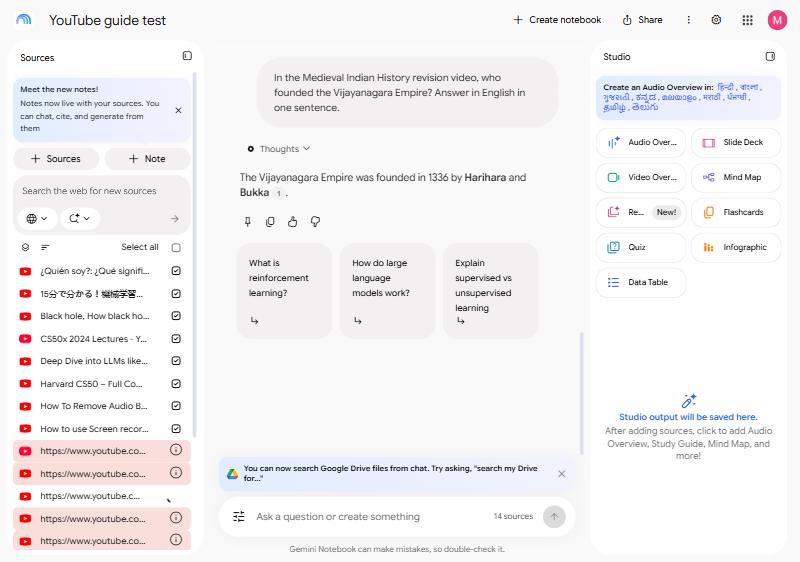
Failed links stay in the source list in red. Hover over the info icon to read the reason, and delete them when you're done.
We didn't test private or unlisted videos. Google says only public videos are supported. Results come from one notebook on one day, and Google can change this at any time.
What Gemini Notebook takes from a video
- The transcript text only, from the video's captions, not the picture. Can it watch videos?
- Uploaded captions read better than automatic ones. The course came in with punctuation and speaker names. The talk with automatic captions came in as one long unpunctuated run, filler words included.
- No timestamps. The source is plain text, so nothing links a sentence to a moment in the video.
- One source slot per video: 50 slots on the free plan, up to 600 with a Google AI plan. See the limits
Google's rules: public videos with captions and speech, in a supported language. Google says a video uploaded in the last 72 hours may not be available. If a video is later deleted or made private, its source is removed within 30 days.
From Google's help page Add or discover new sources for your notebook, read October 30, 2026.
Long YouTube videos
There's no limit on length. The limit is 500,000 words of captions. Our two long videos ran at about 11,000 to 12,000 words an hour, so that's roughly 40 hours of steady talk.
Long doesn't always mean complete, though. The course runs 24 hours 51 minutes, but its source stopped at 22 hours 39 minutes, before the final two sections. Gemini Notebook wasn't cutting it short: the video's uploaded captions end at that point on YouTube too.
So check the end of any long source. Open it, scroll to the last lines, and compare them with the end of the video.
YouTube videos in other languages
Hindi, Japanese and Spanish videos all imported from automatic captions. The transcript stayed in the video's language, in its own script, so Hindi came in as Devanagari. In our English-language account, the summary came in English.
You can ask in English about a video in another language. We asked in English who founded the Vijayanagara Empire, using a Hindi history video, and got the right answer with a citation.
Google says a video's language must be supported, but it doesn't list the languages for YouTube. If a video fails with captions present, its language may be the reason.
Finding a moment in a video
Don't trust a timestamp from the chat. The source has no times in it, so any time you get is worked out from somewhere else.
We asked when the SQL lecture starts in the 25-hour course. The chat answered 15:16:07, with citations. The real start is 15:39:25, 23 minutes later. It had added up lecture lengths from the playlist page in the same notebook, and that playlist is a different year of the course.
Instead, ask the chat for the exact words, then find them in YouTube's own Show transcript panel, which has times. Or use the chapters in the video's description.
Why playlist and channel links don't work
Gemini Notebook takes links to single videos. A playlist link is the trap, because it looks like it worked. A source appears with the playlist's title, and the summary sounds confident. But it's built from the page's description, so you can't ask about what's said in the videos.
A channel link fails with a domain restrictions message. A link to a video inside a playlist adds only that video.
YouTube to NotebookLM Chrome extension: do you need one?
Not for a few videos. Paste the links and you're done. An extension earns its place when copying links gets tedious, or when you want more than the transcript.
| What you want | Gemini Notebook alone | With an extension |
|---|---|---|
| A few videos | Paste the links | Not needed |
| A whole playlist or channel | Copy every video's link yourself | Reads the list and adds the videos |
| A long playlist in a small notebook | One slot per video | KastorFlow can merge it into one source |
| What's shown on screen | Not imported | KastorFlow can capture frames as a PDF |
Several extensions do this. YouTube to NotebookLM is the best known. KastorFlow is ours, and it also does the wider notebook work. Compare the two. Whichever you try, check what permissions it asks for.
A whole playlist or channel, with KastorFlow
- Copy a YouTube playlist, channel or search address.
- Paste it into the bar on KastorFlow's Collect page and click Analyze.
- Choose how many videos to import, newest first. YouTube shows about 30 of a channel's recent uploads and about 20 search results.
- Under How to import, choose each video as its own source, or the whole list merged into one source.
- Check the notebook in Adding to, then click Import. The import keeps running if you close the page.
One source for the whole playlist saves room: a 40-video playlist fills 40 of a free notebook's 50 slots as separate sources, and one slot as a single source.
| In KastorFlow | Free | Pro |
|---|---|---|
| One video link | 10 links a day | No daily limit |
| Every video in a playlist, channel or search, each as its own source | 3 runs a month | No monthly limit |
| A whole playlist as one source | 1 a month | 50 a month |
| Video frames: on-screen frames and the full transcript as a PDF | 3 a month | No monthly limit |
A run that imports nothing isn't counted. Compare every tool by plan
When an import goes wrong
| What you see | What it means | What to do |
|---|---|---|
| "This video cannot be imported. Transcript not available." | No captions, or no speech | If it's your video, add captions in YouTube Studio. If what matters is on screen, capture the frames. |
| "Unable to import this web page due to domain restrictions." | You pasted a channel link | Paste links to single videos. |
| The source has the right title, but the chat knows nothing about the videos | You pasted a playlist link | Delete it and add the videos. |
| The source stops before the video ends | The captions stop early | Check the video's own transcript on YouTube. |
More on YouTube and Gemini Notebook
- Add a YouTube playlist: several videos at once, or a whole playlist as one source
- Turn a YouTube channel into a notebook you can ask
- Notes, summaries and flashcards from videos, for one video or a whole course
- Can it watch YouTube videos? What the transcript misses
- The YouTube to NotebookLM Chrome extension: KastorFlow's YouTube tools by plan
Add a playlist, a channel or YouTube search results in one go. Free to install, no account needed.
Add to ChromeQuestions
Can Gemini Notebook import a YouTube playlist?
Not from the playlist link. In our test the link came in as a web page, with the video titles and lengths but no transcripts. Paste each video's link, or use an extension: KastorFlow adds every video as its own source, or the whole playlist as one source.
Why won't my YouTube video import?
Most often the video has no captions, and you'll see "This video cannot be imported. Transcript not available." Only public videos import. Google also says a video uploaded in the last 72 hours may not be available, though two videos uploaded minutes earlier imported in our test.
Is there a length limit for YouTube videos in NotebookLM?
Not on length. The limit is 500,000 words of captions, which is roughly 40 hours of steady talk. A course of almost 25 hours imported in our test.
Does NotebookLM work with YouTube videos in other languages?
Yes, if the language is supported. Hindi, Japanese and Spanish videos with automatic captions all imported in our test. The transcript stayed in the video's language, and we could ask about it in English.
Can NotebookLM give timestamps for a YouTube video?
Not reliably. The transcript it imports has no times. In our test the chat gave a precise start time that was 23 minutes wrong. Use the video's chapters, or find a quote in YouTube's own transcript.
Does Gemini Notebook import the video itself?
No, only the transcript text. To keep what's on screen too, KastorFlow's Video frames saves frames from the video with its full transcript as a PDF source.
Do I need a Chrome extension for YouTube to NotebookLM?
Not for a few videos: you can paste several links at once in Gemini Notebook. An extension helps with a whole playlist or channel, because Gemini Notebook can't read those links.
Does adding YouTube videos work the same in NotebookLM and Gemini Notebook?
Yes. Google renamed NotebookLM to Gemini Notebook in July 2026, and adding YouTube sources works the same way. What changed with the rename