 KastorFlow
Tested and updated November 6, 2026
When a YouTube video won't import into NotebookLM
Gemini Notebook imports a video's captions, not the video, so it needs a single public video with captions and speech. In our tests the two error messages were "This video cannot be imported. Transcript not available." (no captions or no speech) and "Unable to import this web page due to domain restrictions." (a channel link). A playlist link was worse: it seemed to work but brought in no transcripts. Find your symptom in the table below. If the video has no captions and what matters is on screen, KastorFlow can capture its frames instead.
Gemini Notebook is NotebookLM's new name. The causes are the same in both.
What we saw when imports failed
On October 30, 2026 we added 18 YouTube links to one test notebook: long courses, foreign-language videos, a Short, brand-new uploads, a playlist, a channel, and some we expected to fail. On November 6, 2026 we added more links to a fresh notebook, several at a time. Here's what failed, and how.
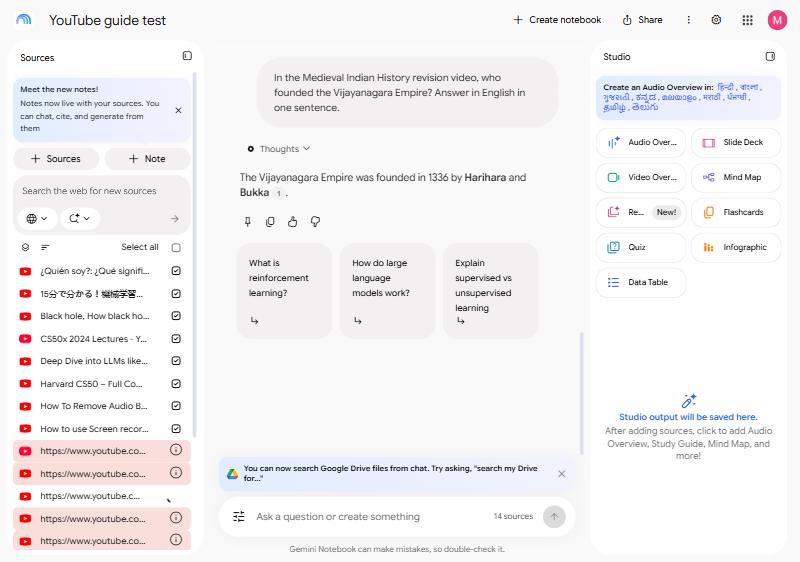
A failed link takes no time to spot: it's red. The quiet failures are harder. A playlist link, a repeated video and a captions file that stops early all look like they worked.
What you see, and what to do
| What you see | Why | What to do |
|---|---|---|
| "This video cannot be imported. Transcript not available." | The video has no captions, or no speech to caption. We saw it on both. | If it's your video, add captions in YouTube Studio. Otherwise capture its frames. |
| "Unable to import this web page due to domain restrictions." | You pasted a channel's address | Paste links to single videos, or add the channel with KastorFlow |
| A source with the playlist's name, but the chat knows nothing about the videos | You pasted a playlist link. It brings in about 700 words of page text and no transcripts. | Remove it and add the videos. Add a playlist |
| A broken link: nothing came in | The address is wrong or the video is gone | Copy the link again from the video's page |
| The same video shows up twice | Gemini Notebook doesn't check for duplicates | Remove one copy |
| A source has a different title from the link you pasted | The page redirected. In our test a redirected Wikipedia link came in under the page's current title. | Nothing is wrong. Rename the source if it helps. |
| The source stops before the video ends | The captions stop early. A 25-hour course came in only up to 22 hours 39 minutes, because its captions end there on YouTube too. | Check the end of long sources against YouTube's own transcript |
| The transcript is one long run with no punctuation | The video has automatic captions only | It still works for questions. Check names and terms. |
| The chat can't say what's on screen | Only the spoken words come in | Bring the picture in with slides, screenshots or frames |
| A timestamp from the chat is wrong | The transcript has no times. One answer was 23 minutes off. | Search for the words in YouTube's Show transcript panel |
| The notebook won't take more sources | It's full: 50 sources on the free plan | Delete sources, or merge a playlist into one source |
Two things we expected to fail didn't. Two videos uploaded minutes earlier imported fine from their automatic captions, although Google says a video from the last 72 hours may not be available. If a new upload fails, try again later. We didn't test private or unlisted videos. Google says only public videos are supported.
Results from our test notebooks on October 30 and November 6, 2026. Google's rules from its help page Add or discover new sources for your notebook: public videos with captions only, the transcript only, a possible delay for new uploads, and a 500,000-word cap on a video's captions.
Clean up after a failed import
- Read the reason. Hover over the info icon next to the red link.
- Remove the failed source. Open its menu and choose Remove source. The menu also has Move to and Rename source.
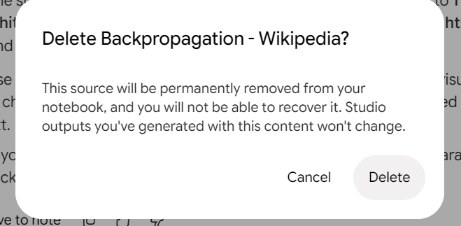
- Confirm. Gemini Notebook warns that the source "will be permanently removed from your notebook, and you will not be able to recover it." Things you already made in Studio from it won't change.
Sources go one at a time. We found no way to remove several at once in Gemini Notebook itself. The tick boxes next to sources choose which ones the chat uses; they don't select sources for deleting.
There's no refresh for a YouTube source either. If a creator adds captions to a video later, remove the old source and add the link again. Keep sources up to date
No captions? Capture the frames
Some of the most useful videos have no captions: screen recordings, silent demos, slide walkthroughs with music. Gemini Notebook can't import them at all. KastorFlow's Video frames takes pictures from the video playing in your tab instead.
- Open the video's page and start the video.
- Open KastorFlow's side panel there and choose Capture video frames.
- Set Start time, Duration in seconds (up to an hour) and Frames per second. For slides, tick Keep keyframes only, so each slide comes in once instead of many times.
- Click Start capture, and keep the video's tab in front while it runs.
The frames go into your notebook as one PDF source. When the video has no captions, the capture still finishes and says the frames were imported without a transcript. The slides, code or diagrams on screen still come in. Video frames is 3 captures a month on Free, with no monthly limit on Pro.
When KastorFlow's YouTube import stops
KastorFlow reads playlists and channels from YouTube itself, so it has its own messages. Each one says what to do.
| KastorFlow says | What to do |
|---|---|
| "That isn't a YouTube channel, playlist or video address. Paste one from your browser's address bar." | Copy the address from the browser's address bar on the playlist, channel or video page |
| "This playlist or channel is private or doesn't exist." | Check the link. Private playlists can't be read. |
| "YouTube sign-in required. Make sure you're signed in to YouTube in this browser." | Open YouTube in a tab, sign in, then try again |
| "This took too long. Check the link or try again." | Try again. Reading the list took longer than 30 seconds. |
| "This notebook has 4 of 50 source slots free, and this needs 20." (your numbers will differ) | Import fewer videos, merge them into one source, or pick another notebook. Nothing was started. |
| "NotebookLM is signed out. Open NotebookLM in a tab and sign in, then try again." | Sign in to Gemini Notebook in a tab |
| "YouTube page structure changed — the parser needs updating. Please report this." | YouTube changed its page. Tell us, and paste the video links by hand for now. |
Other sources that won't import into NotebookLM
- A web page comes in empty or partial: Gemini Notebook takes only the page's visible text, and paid articles aren't supported. Paste the text as a Copied text source instead.
- A PDF won't upload: a copy-protected PDF fails, and so does any file over 200 MB or 500,000 words. Split a large file, or remove the copy protection if it's your document.
- A Drive source stopped working: if the file is deleted or you lose access to it, the source becomes inaccessible. You need at least view access.
- A YouTube link is refused: besides missing captions, Google lists invalid links, videos it flags as potentially unsafe and unsupported languages.
From Google's help pages Add or discover new sources and Gemini Notebook FAQ, read October 25, 2026, and the Add sources box, read November 6, 2026.
Capture what a video shows, not just what it says. Free to install, no account needed to start.
Add to ChromeQuestions
Why does NotebookLM say transcript not available?
Gemini Notebook, NotebookLM's new name, imports a video's captions as its transcript. A video with no captions, uploaded or automatic, or with no speech, gives it nothing to import. In our test both failed with "This video cannot be imported. Transcript not available."
What does "unable to import this web page due to domain restrictions" mean?
In our test it appeared when we pasted a YouTube channel's address. Gemini Notebook takes links to single videos, not channels. Paste each video's link, or use KastorFlow, a Chrome extension, to add the channel's recent uploads.
Why is my YouTube source empty in NotebookLM?
A video without captions doesn't come in empty; it fails with "Transcript not available." A source that has a title but nothing from the videos is usually a playlist link, which brings in the page's text only. Remove it and add the videos' own links.
Can NotebookLM import a video uploaded today?
Often, yes. Google says videos uploaded in the last 72 hours may not be available, but two videos uploaded minutes earlier imported in our test. If a new upload fails, try again later.
Why does the same YouTube video appear twice?
Gemini Notebook doesn't check for duplicates. In our tests a link pasted twice became two sources. Remove one copy from its menu with Remove source.
Why won't my PDF upload to NotebookLM?
Usually because it is copy-protected, or over 200 MB or 500,000 words. Gemini Notebook rejects both. Split a large PDF into parts, or upload an unprotected copy of your own document.
More on YouTube and Gemini Notebook: YouTube to Gemini Notebook · a whole playlist · a channel · notes and flashcards from videos · can it watch videos? · KastorFlow's YouTube tools