 KastorFlow
Checked every week · Updated November 6, 2026
What's new in Gemini Notebook (NotebookLM)
Newest first. Each update is dated and linked to its source.
The newest changes we've seen, in our own test on November 6, 2026: Gemini Notebook, NotebookLM's new name, can now sort a notebook's sources into labelled groups in one click, and group notebooks into Collections on its home page. Flashcards can include images, Audio Overview offers four formats, Reports is marked New in Studio, and you can delete a notebook's chat history. Before that came a review step for slide decks and Video Overviews (October 19), compute-based usage limits (September 2), the rename to Gemini Notebook (July 16) and Gemini 3.5 as the default model (June 8).
November 2026
We found these in a fresh test notebook on November 6, 2026. The date is the day we saw each change, not the day Google released it.
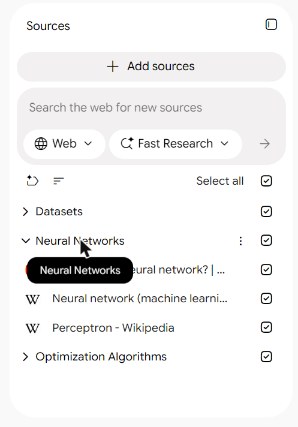
- : Auto-label sources by topic. A button above the source list sorts a notebook's sources into labelled groups. One click grouped our 8 sources in about 8 seconds, into Neural Networks, Optimization Algorithms and Datasets. Groups fold open and shut. A label's menu has Rename, Remove and Add emoji, and removing a label keeps its sources: they go back to the unlabelled list. A source's menu has Move to, for moving it to another label. Labels work inside one notebook; they don't group notebooks. Folders in NotebookLM
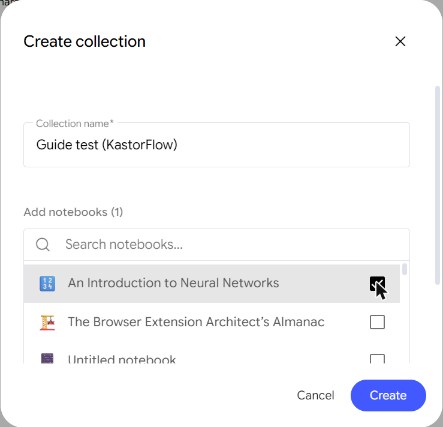
- : Collections. The home page now has tabs for All, My notebooks, Shared with me and Collections. New collection asks for a name and lets you tick the notebooks to add, with a search box. A collection's card shows how many notebooks it holds, and its menu has Edit, Delete and Add emoji. This is Google's own way to group notebooks, much like folders. We didn't test whether one notebook can sit in two collections, or whether collections can go inside each other. Folders in NotebookLM
- : Images on flashcards. The Flashcards options have a new Include images setting, marked New, with Include or Text only. The other settings are the number of cards (Fewer, Standard, More), the level (Easy, Medium, Hard), the language, which sources to use and a topic box. Standard gave us 52 cards from one 18-minute video. We found no way to download the cards: the set's menu has only Delete. Our flashcard test
- : Audio Overview formats. Audio Overview offers four formats: Deep Dive, Brief, Critique and Debate, with Short, Default or Long length, a language and a box for what to focus on. A Brief from one video took about 4 minutes and ran 1 minute 39 seconds. Its menu has Download, so you can keep the file, but there is no podcast feed. Our audio test
- : Reports marked New. Studio's buttons were Audio Overview, Slide Deck, Video Overview, Mind Map, Reports (marked New), Flashcards, Quiz, Infographic and Data Table.
- : Delete chat history. A notebook's chat was still there after we reloaded the page, with a time stamp. The notebook's More options menu, top right, has Delete chat history, with the note "Chat history is private to you." The same menu has Configure Chat, Customize notebook and Copy notebook.
Some things we looked for and didn't find. You still remove sources one at a time; the tick boxes next to sources choose what the chat uses, not what to delete. A YouTube or website source's menu has no refresh: to update one, you remove it and add it again.
October 2026
- : A review step for slide decks and Video Overviews. Gemini Notebook proposes a topic list and plan; you edit it, then it builds. PPC Land
September 2026
- : Usage is measured by compute instead of daily counts. Your allowance refreshes every 5 hours up to a weekly limit, and Studio shows how much a generation will use before you start. Google Help · What it means for you
July 2026
- : NotebookLM is renamed Gemini Notebook, at notebook.google.com; old links still work. Notebooks open in the Gemini app too, and each notebook gets a cloud computer that writes and runs code on your data (Google AI Ultra first). Google · What changed · How search moved to the new name
June 2026
- : Gemini 3.5 becomes the default model, and you can build a notebook's sources from the chat. TechCrunch
Earlier
From Project Tailwind in 2022 to Audio Overviews, Plus and Video Overviews: NotebookLM history
KastorFlow keeps up
KastorFlow, a Chrome extension for Gemini Notebook, works on notebook.google.com and notebooklm.google.com. What KastorFlow adds
Google's new labels sort sources inside one notebook, and Collections group whole notebooks. KastorFlow's Library works across all your notebooks at once: tags and folders, a map of every notebook, source and tag, and one search over everything with Ctrl+K. Organize with KastorFlow
Better sources in, better answers out. Free to install.
Add to ChromeQuestions
What's the latest NotebookLM update?
The newest changes we've seen, on November 6, 2026: Gemini Notebook, NotebookLM's new name, can sort a notebook's sources into labelled groups in one click, and group notebooks into Collections on its home page. Flashcards can include images, and you can delete a notebook's chat history.
Does Gemini Notebook have folders now?
In a way. Collections on the home page group notebooks, much like folders. Inside a notebook, Auto-label sources by topic sorts sources into labelled groups. Labels stay inside one notebook.
How often does NotebookLM get updates?
Often. In 2026 Google shipped a new model in June, the rename to Gemini Notebook in July, new usage limits in September and a review step in October, and by November 6 we saw source labels and Collections. This page is checked every week.