 KastorFlow
Tested and updated October 30, 2026
NotebookLM use cases
Eight ways to use Gemini Notebook, formerly NotebookLM: what to add, what to ask, and what happened when we tried them.
Gemini Notebook works best when you give it your own material and a question. It answers from your sources and cites them. People use it to study, learn from videos, listen on the go, review papers, survey a topic, present findings, prepare meetings and train new colleagues. We ran the first five below and they held up, with some limits worth knowing.
At a glance
| Use case | Feature that does the work | What we saw |
|---|---|---|
| Prepare for an exam | Flashcards, Quiz, Study Guide | Flashcards ready in a minute or two |
| Learn from YouTube lectures | YouTube sources, chat | A course of almost 25 hours imported in under a minute |
| Review on the go | Audio Overview | 14 minutes of audio in about 6 minutes |
| Review papers and reports | Chat, Data table | Right figures from a PDF table, with citations |
| Survey a topic and keep up with it | Deep Research | A report from 33 sources in about 4 minutes |
| Present what you found | Reports, Slide deck, Infographic | Not tested |
| Prepare meetings and sales calls | Chat, Briefing Doc | Not tested |
| Train and onboard | Video Overview, Quiz, Share | Not tested |
Tested in Gemini Notebook on October 30, 2026. Times will vary with your sources.
For study
Prepare for an exam
Add: lecture notes, slides and readings.
Try: "What are the five ideas most likely to come up, and where is each covered?" Then make Flashcards and a Quiz in Studio. Flashcards let you choose the number of cards and the difficulty, and tell them what to focus on. The Study Guide report adds a short-answer quiz, essay questions and a glossary.
Why testing yourself works: AI for studying, by the numbers.
Learn from YouTube lectures
Add: a lecture or a course, by link.
Try: "Explain the part on recursion as if I missed the class."
A course of almost 25 hours imported in under a minute. Videos in Hindi, Japanese and Spanish worked too, and we could ask about them in English. Don't ask for timestamps, though: the chat gave us one that was 23 minutes off. All 18 links we tested
Review on the go
Add: whatever you need to review.
Try: an Audio Overview. Deep Dive is a conversation between two hosts, Brief is a short summary, Critique is an expert review of your material, and Debate gives two sides. Ours ran 14 minutes 15 seconds and took about 6 minutes to make. KastorFlow can publish Audio Overviews to a podcast feed for any podcast app (Pro).
For research
Review papers and reports
Add: the papers, as PDFs or PDF links.
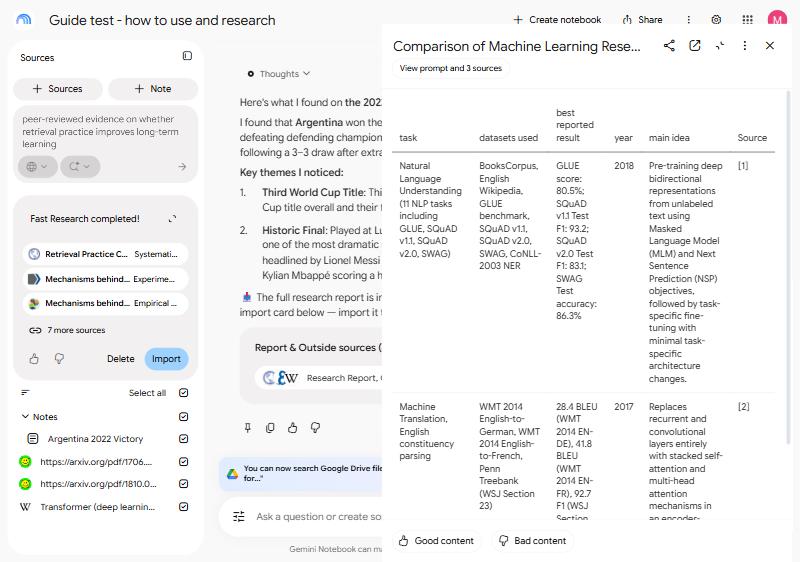
Try: a Data table with the columns you need. We asked for "task, datasets used, best reported result, year, and main idea" across two papers. It came back in a minute or two, with the right scores and a link to each source.
How far to trust AI answers: AI for research, by the numbers.
Survey a topic and keep up with it
Add: nothing yet. Type your question in the Sources panel and choose Deep Research.
Ours took about 4 minutes and wrote a report of roughly 4,000 words from 33 sources. Fast Research took about 20 seconds and listed 10, though two papers appeared twice. Fast vs Deep Research
To keep up, add news, papers and posts as they appear, and ask "What changed in these new sources?" KastorFlow imports RSS feeds and refreshes sources on a schedule (Pro). We haven't tested this part, because it plays out over weeks.
Present what you found
Studio turns a notebook into a Slide deck, Infographic, Report, Mind map or Data table. Report templates change with your sources: ours suggested a technical specification and a conceptual explainer.
What the research says about learning a field with AI: sourced statistics
For work
Prepare meetings and sales calls
Add: product specs, notes and call transcripts.
Try: "Write a one-page brief on this account: what they want, what's open, what to ask next." Then make slides from the same sources. A Briefing Doc report gives you an overview with key insights and quotes.
Train and onboard
Add: manuals and procedures.
Try: a Video Overview and a quiz, then click Share and add the new colleague so they can ask their own questions. Notebooks start as Restricted, so only people you add can open them.
More ideas for teams on Google's plans page.
When to use something else
- General questions. It says your sources don't cover them and offers web research. The Gemini app is more direct.
- What's on screen in a video. It reads the captions, not the picture. Can it watch videos?
- A whole playlist or channel. Those links don't bring in the videos. Adding a playlist
- Notes you keep for years. Links between notes become plain text, and uploaded notes don't update. NotebookLM vs Obsidian
- Anything private in your notes. Obsidian's hidden comments came through in our upload, so check your files first.
Save AI chats, web pages and whole playlists as sources, and search every notebook at once. Free to install.
Add to ChromeQuestions
What is Gemini Notebook best for?
Working from your own material. It answers from the sources you add and cites them, so it suits studying, reviewing research and any job where you need to trust where an answer came from.
Is Gemini Notebook good for studying?
Yes. Add your course material, then use Studio's flashcards and quizzes to test yourself and Audio Overviews to review away from your desk.
Can Gemini Notebook find sources on the web?
Yes. From the Sources panel, Fast Research and Deep Research search the web and suggest sources to add.
What shouldn't I use Gemini Notebook for?
General questions, anything that depends on what's shown on screen in a video, and finding exact times in a video. It also isn't a good home for notes you want to keep linked and up to date. When to use something else